Showing posts with label jobs. Show all posts
// // Leave a Comment

Depth Map Bias and Self-Shadowing Artifacts, Transparency Support, Raytraced Shadows, and How Raytraced Shadows Work?

In this post it contains a very quick reference of the book Digital Lighting & Rendering and Author Jeremy Birn shares about Depth Map Bias and Self-Shadowing Artifacts, Transparency Support, Raytraced Shadows, and How Raytraced Shadows Work? from his new book Digital Lighting & Rendering, Third Edition on creating more convincing lighting and rendering.
To help you make better 3D renderings, here are some tips for creating more engaging and believable lighting. Some of these steps are frequently forgotten or skipped by beginners, but all of them are necessary and useful techniques in crafting professionally lit scenes.

Depth Map Bias and Self-Shadowing Artifacts


Artifacts like bands or grid patterns (as shown in Figure 3.14), are often caused by having a parameter called depth map bias set too low. For scenes built on a very large scale, you may need to raise the bias of some shadows to eliminate such artifacts.


Figure 3.14 A depth map bias that's too low causes artifacts that appear to be stripes, grids, or moiré patterns, shown at a bias of 0.005 (left), 0.02 (middle), and 0.25 (right).

Bias is a number that gets added to each distance measurement in the shadow map, pushing the shadow-start-distance further out from the light. Increasing the bias slides the shadowing effect out a little further away from the surface casting the shadow, so that it doesn't accidentally start too soon and cause artifacts. Artifacts such as banding or grid patterns appear because points on the surface essentially begin shadowing themselves, in areas where the limited number of depth samples have under-estimated the actual distance from the light to the surface.

The bias is set in the distance units of your software, so a scene built on a larger scale might need a higher bias, or a scene built on a very small scale might need a lower bias.

Fixing Light Leaks


Too high a bias can cause visible gaps between the object casting a shadow and the point where the shadow itself starts. A high bias can even let light "leak" through walls and corners that should be blocking the light, as shown in Figure 3.15.


Figure 3.15 A depth map bias that's too high, combined with thinly built geometry, can cause light leaks (left). Lowering the bias (right) is one way to fix this problem.

If you have light leaking through corners, there are some things you should do to isolate and fix the problem:

Hide all the other lights in your scene, so that you are test-rendering only one light.
If you are using a spotlight, make sure the cone is as narrow as possible to aim it just where it needs to shine.
Reduce the depth map bias.
Reduce the filtering or softness applied to the shadow, which extends light into shadow areas in much the same way as an increased bias.
A light leak is not always the fault of the lighting; often, it is a problem with your modeling. Here are some tips to fix your models to avoid light leaks:

Build thicker geometry in your architecture, instead of using infinitely thin surfaces. Walls of real houses have a thickness, and yours should too.
Add a polygon outside a building to block light where it is not needed.
Make sure that all corners are properly beveled, not perfect 90-degree angles.
If a part of your geometry isn't casting shadows, try adding another surface, such as a primitive shape, inside the part.
For some beginners, raising the shadow map resolution seems to be their first response to any shadow problem, even though this takes more memory and rendering time. If a problem with your shadows can be fixed by adjusting the bias, which does not add to your rendering time, then get the bias right first. If your shadows are not working well with a particular model, sometimes you need to fix the model.

Transparency Support


You expect a transparent object to cast a lighter shadow, and an opaque object to cast a darker shadow. However, conventional depth map shadows do not respond correctly to transparency, and are not any lighter when blocked by a transparent object For example, in Figure 3.16, the shadow becomes as dark under a transparent material as it is under an opaque material. Remember that each point in the depth map stores only one distance at which the light will be cut off, so it either stops at the glass or it doesn't, with no shades possible in between.


Figure 3.16 A limitation of conventional depth map shadows is that different levels of transparency in objects do not cause lighter shadows.

You may be able to work around the lack of transparency support in scenes that have a small amount of glass by setting glass objects not to cast shadows, or by using light-linking to remove them from some of the shadow-casting lights. However, in scenes with a large amount of glass (in which you will probably be raytracing already to achieve refraction), you may want to bite the bullet and switch to raytraced shadows.

Raytraced Shadows


Raytraced shadows are shadows computed by tracing rays of light between light sources and illuminated objects. Raytraced shadows are computed one pixel at a time as you render rather than being pre-computed and stored in shadow maps. Raytraced shadows have a number of advantages over shadow maps:
  • Raytraced shadows become lighter when shining through transparent surfaces, and they can even pick up color from colored transparent surfaces, as shown in Figure 3.17.


Figure 3.17 Raytraced shadows can pick up different levels of color and opacity when shining through transparent surfaces.

  • With raytraced shadows, you don't run into many of the problems associated with shadow maps, such as needing to adjust bias to prevent artifacts or fix light leaks.
  • Raytraced shadows do not use a fixed-resolution map, so they can always be crisp and accurate in any resolution rendering.
  • Raytraced shadows support higher quality, more realistic soft shadows, when used with area lights as described below.
  • Raytraced shadows work equally well from most types of lights, with no efficiency advantage pushing you toward spotlights.

So, if raytraced shadows are so wonderful and easy to use, why didn't I write about them first? And why do most feature films still rely primarily on shadow maps? There are two simple answers:

Raytraced shadows generally take longer to render than shadow maps. For complex scenes, the difference can be huge.
Employing raytracing in your scene increases memory use, and effectively limits the complexity of the scenes you can render on your computer.
Thus, raytraced shadows may be the first choice of a beginner or someone working on simpler scenes, but currently they're less desirable for professionals working on larger, film-resolution projects or doing animation work on tight deadlines.

How Raytraced Shadows Work?


Conventional raytracing works backwards in the sense that each ray is computed starting at the camera, instead of starting at the light source as in real life. For each pixel in your image, a ray is traced out from the camera at the appropriate angle until it hits part of a surface that needs to be rendered, as shown by the white lines in Figure 3.18.


Figure 3.18 Raytracing starts with primary rays fired from the camera (white). But for ray-traced shadows, rays need to be fired from each rendered point towards the light, to see if the path is clear (yellow) or blocked and requiring a shadow (red).

For each point on a surface, the renderer needs to determine which lights will be illuminating that point. If a light uses raytraced shadows, then the renderer needs to trace a path from the surface point to the light. If any polygons are found to be blocking that path, then the light will be blocked from the points on the surface. The area where the light is blocked from points on the surface forms the raytraced shadow. The yellow rays in Figure 3.18 show rays followed to the light; red rays show rays that were blocked by geometry, indicating that the point being rendered is in shadow.

If there is more than one light casting raytraced shadows, then the process of checking through space to see whether there are any polygons blocking a ray needs to be repeated for each light with raytraced shadows. All of this needs to be repeated at least once for each pixel, and usually more than once per pixel when rendering with anti-aliasing (anti-aliasing techniques will be discussed in Chapter 9, "Shaders and Rendering Algorithms.")

The result is that raytraced shadows slow down even the fastest computers. Furthermore, the time required to raytrace the shadow is only a part of the performance hit taken by raytracing. All of the polygons in your scene that might be casting a shadow need to be stored in memory in a way that can be searched through. Instead of allowing the rendering software to focus on a small part of your scene at one time, the raytracing process requires continual access to large amounts of data, usually stored in memory in many sorted lists of polygons. The result is that raytracing a large, complex scene uses up far more memory than rendering without raytracing.
Read More
// // Leave a Comment

What are NURBS or Non-Uniform Rational B-Splines?


Image: Google Search

What are NURBS?


NURBS, Non-Uniform Rational B-Splines, are mathematical representations of 3‑D geometry that can accurately describe any shape from a simple 2‑D line, circle, arc, or curve to the most complex 3‑D organic free-form surface or solid. Because of their flexibility and accuracy, NURBS models can be used in any process from illustration and animation to manufacturing.

NURBS geometry has five important qualities that make it an ideal choice for computer-aided modeling.

  • Several industry‑standard methods are used to exchange NURBS geometry. This means that customers are able to move their valuable geometric models between various modeling, rendering, animation, and engineering analysis programs. They can store geometric information in a way that will be usable for the foreseeable future.

  • NURBS have a precise and well-known definition. The mathematics and computer science of NURBS geometry is taught in most major universities. This means that specialty software vendors, engineering teams, industrial design firms, and animation houses that need to create custom software applications, can find trained programmers who are able to work with NURBS geometry.

  • NURBS can accurately represent both standard geometric objects like lines, circles, ellipses, spheres, and tori, and free‑form geometry like car bodies and human bodies.

  • The amount of information required for a NURBS representation of a piece of geometry is much smaller than the amount of information required by common faceted approximations.

  • The NURBS evaluation rule, discussed below, can be implemented on a computer in a way that is both efficient and accurate.


What is NURBS Geometry?


NURBS curves and surfaces behave in similar ways and share terminology. Since curves are easiest to describe, I will cover them in detail. A NURBS curve is defined by four things: degree, control points, knots, and an evaluation rule.

Degree


The degree is a positive whole number.

This number is usually 1, 2, 3 or 5, but can be any positive whole number. NURBS lines and polylines are usually degree 1, NURBS circles are degree 2, and most free‑form curves are degree 3 or 5. Sometimes the terms linear, quadratic, cubic, and quintic are used. Linear means degree 1, quadratic means degree 2, cubic means degree 3, and quintic means degree 5.

You may see references to the order of a NURBS curve. The order of a NURBS curve is positive whole number equal to (degree+1). Consequently, the degree is equal to (order‑1).

It is possible to increase the degree of a NURBS curve and not change its shape. Generally, it is not possible to reduce a NURBS curve’s degree without changing its shape.

Control Points


The control points are a list of at least degree+1 points.

One of easiest ways to change the shape of a NURBS curve is to move its control points.

The control points have an associated number called a weight . With a few exceptions, weights are positive numbers. When a curve’s control points all have the same weight (usually 1), the curve is called non-rational, otherwise the curve is called rational. The R in NURBS stands for rational and indicates that a NURBS curve has the possibility of being rational. In practice, most NURBS curves are non-rational. A few NURBS curves, circles and ellipses being notable examples, are always rational.

Knots


The knots are a list of (degree+N-1) numbers, where N is the number of control points. Sometimes this list of numbers is called the knot vector. In this term, the word vector does not mean 3‑D direction.

This list of knot numbers must satisfy several technical conditions. The standard way to ensure that the technical conditions are satisfied is to require the numbers to stay the same or get larger as you go down the list and to limit the number of duplicate values to no more than the degree. For example, for a degree 3 NURBS curve with 11 control points, the list of numbers 0,0,0,1,2,2,2,3,7,7,9,9,9 is a satisfactory list of knots. The list 0,0,0,1,2,2,2,2,7,7,9,9,9 is unacceptable because there are four 2s and four is larger than the degree.

The number of times a knot value is duplicated is called the knot’s multiplicity. In the preceding example of a satisfactory list of knots, the knot value 0 has multiplicity three, the knot value 1 has multiplicity one, the knot value 2 has multiplicity three, the knot value 3 has multiplicity one, the knot value 7 has multiplicity two, and the knot value 9 has multiplicity three. A knot value is said to be a full-multiplicity knot if it is duplicated degree many times. In the example, the knot values 0, 2, and 9 have full multiplicity. A knot value that appears only once is called a simple knot. In the example, the knot values 1 and 3 are simple knots.

If a list of knots starts with a full multiplicity knot, is followed by simple knots, terminates with a full multiplicity knot, and the values are equally spaced, then the knots are called uniform. For example, if a degree 3 NURBS curve with 7 control points has knots 0,0,0,1,2,3,4,4,4, then the curve has uniform knots. The knots 0,0,0,1,2,5,6,6,6 are not uniform. Knots that are not uniform are called non‑uniform. The N and U in NURBS stand for non‑uniform and indicate that the knots in a NURBS curve are permitted to be non-uniform.

Duplicate knot values in the middle of the knot list make a NURBS curve less smooth. At the extreme, a full multiplicity knot in the middle of the knot list means there is a place on the NURBS curve that can be bent into a sharp kink. For this reason, some designers like to add and remove knots and then adjust control points to make curves have smoother or kinkier shapes. Since the number of knots is equal to (N+degree‑1), where N is the number of control points, adding knots also adds control points and removing knots removes control points. Knots can be added without changing the shape of a NURBS curve. In general, removing knots will change the shape of a curve.

Knots and Control Points


A common misconception is that each knot is paired with a control point. This is true only for degree 1 NURBS (polylines). For higher degree NURBS, there are groups of 2 x degree knots that correspond to groups of (degree+1) control points. For example, suppose we have a degree 3 NURBS with 7 control points and knots 0,0,0,1,2,5,8,8,8. The first four control points are grouped with the first six knots. The second through fifth control points are grouped with the knots 0,0,1,2,5,8. The third through sixth control points are grouped with the knots 0,1,2,5,8,8. The last four control points are grouped with the last six knots.

Some modelers that use older algorithms for NURBS evaluation require two extra knot values for a total of (degree+N+1) knots. When Rhino is exporting and importing NURBS geometry, it automatically adds and removes these two superfluous knots as the situation requires.

Evaluation Rule


A curve evaluation rule is a mathematical formula that takes a number and assigns a point.

The NURBS evaluation rule is a formula that involves the degree, control points, and knots. In the formula there are some things called B-spline basis functions. The B and S in NURBS stand for “basis spline.” The number the evaluation rule starts with is called a parameter. You can think of the evaluation rule as a black box that eats a parameter and produces a point location. The degree, knots, and control points determine how the black box works.

Conclusion

Through this post I want to give a definition about your doubts about NURBS. because I used to get puzzled when It comes to NURBS. So I thought to give a proper reason and definition about NURBS. I f you have any queries and problems then please share it with me. and you can Comment Below

Read More
// // Leave a Comment

Shadow Algorithms, Depth Map Shadows and Depth Map Framing

The whole content is from the book Digital Lighting and Rendering by Jeremy Birn.
Here you will get to know about the Shadow Algorithm, Depth Map Shadow and about Depth Map Framing

So let me start with Shadow Algorithm

Shadow Algorithms


Many rendering programs let you choose between two popular techniques to calculate shadows:

  • Depth map (also called shadow map) shadows are typically the quickest and most efficient to render, but have a finite resolution and sometimes need to be adjusted (as described below) to avoid artifacts.
  • Raytraced shadows are easy to use and accurate at any resolution, but usually take more rendering time to compute.

The following sections I will discuss how to use depth map shadows and raytraced shadows, along with their advantages, disadvantages, and options for adjusting their appearance.

Depth Map Shadows


Depth map shadows are currently the most popular kind of shadows used in professional lighting work for film. This kind of shadow works by precomputing a depth map to determine where shadows will be rendered.

A depth map (sometimes abbreviated dmap; also called a shadow map) is an array of numbers representing distances. Before the renderer even begins rendering the scene viewed by the camera, it computes a depth map from the point of view of each light that will cast depth mapped shadows. For each direction that the light shines, the depth map stores the distance from the light to the nearest shadow-casting object found in that direction, as shown in Figure 3.12.

Depth-Map-Shadows

Figure 3.12 A depth map shadow is based on an array of distance measurements from the light to the nearest visible geometry, shown here as white lines.


During the rendering, the light will be cut off at the distances specified by the depth map, so that it does not shine farther than the distance stored for each angle. When rendering a surface under the apple, for example, the renderer needs to check only the depth map to see which parts of the ground are shadowed and which aren't. This saves a tremendous amount of rendering time, because the renderer doesn't need to repeatedly check through the scene to verify where objects come between the ground and the light.

Figure 3.12 shows only one row of depth measurements, as would exist in one "slice" of a depth map. A depth map would actually run both horizontally and vertically over the area illuminated by the light. For example, a depth map with a resolution of 512 would actually be 512 distance measurements wide by 512 distance measurements high.

Resolution and Memory Use

A single distance measurement within a depth map is stored as a floating point value. Floating point values can store just about any number, from tiny fractions to huge distances, but use 4 bytes to store each value. The resolution of a shadow map is used for both the horizontal and vertical dimensions of the map, meaning the number of bytes used is actually 4*(resolution^2). Table 3.1 shows the memory used by common shadow map resolutions, in megabytes.

Table 3.1. Shadow Map Memory Use


Depth Map Resolution            Memory Used

128                                           0.06 MB

256                                           0.25 MB

512                                           1 MB

1024                                         4 MB

2048                                         16 MB

4096                                         64 MB

As Table 3.1 shows, increasing your shadow map resolution will rapidly deplete your system's memory. As general defaults to start with, on a well-framed spotlight, a shadow map resolution of 512 will usually be adequate for television, and a resolution for 1024 will usually be good for final shots in a feature film.

Depth Map Framing


To make shadow maps work efficiently, you need to frame your shadow map so that it covers the geometry in the shadow and not too much extra empty space around it.

Spotlights are the lighting tools of choice for most projects that use depth map shadows. You can aim and control a spotlight to put your shadow exactly where it's needed. If you used an omnidirectional (point) light, then the software would need to calculate multiple depth maps in order to calculate the shadows cast in each direction. If you used a directional (infinite) light, then the depth map shadow might be stretched over too broad an area to optimize its resolution.

If you are lighting with a spotlight, make sure that the cone angle is focused as tightly as possible around your subject, so that you don't waste samples in your depth map shooting off into empty space. Figure 3.13 shows how a shadow map works efficiently for a narrow cone angle, but becomes lower resolution at a wider cone angle, as its samples are wasted over a wider area. If the light is very far away from your subject, you may be able to use a very narrow cone angle. You can check your framing by viewing the subject from the light's point of view, to make sure there isn't too much empty space around the subject within your shadow map.

depth-map-framing


There may be situations when it seems impossible to properly frame a depth map for everything that needs to be shadowed. For example, if the sun were lighting a very large scene including a tree, a house, and an animated character, you'd really want a depth map framed neatly around each of these things. In programmable renderers such as Mental Ray and Renderman, studios can implement solutions providing control over which objects are in each shadow map, and which shadow maps a given light uses. In most off-the-shelf 3D software, however, there is no option to specify an arbitrary list of shadow maps that will be used by a light, nor is there an option that allows you to frame each of those shadow maps differently. When you are stuck with a shadow map covering too wide an area, and can't frame it any tighter because of the number of objects it needs to light, you have several choices:


  • Replace your light with several spotlights, each covering a smaller area. This will add a little bit of natural variation to the lighting, which is often a good thing.

  • Turn off shadows in the main light, and instead use shadows-only lights (described later in this chapter) to create shadows beneath each object.

  • Use different well-focused spotlights for each shadow in a separate shadow pass, then use the shadow pass to darken the scene in compositing software. (Chapter 11, "Rendering Passes and Compositing," goes into detail about this.)

  • Raise the resolution of the shadow map as high as necessary. Be mindful of the memory and performance hit that this solution will take, though. If test renders show that you need to go above 2048 or 4096, you may even find that a raytraced shadow (discussed below) could be more efficient in some cases.

Conclusion


In this post and in the previous post I am just publishing some of the factors of lighting from the field of animation and later I will be discussing on it and I hope you all will like it. 


Read More
// // Leave a Comment

InContext Solutions Recruiting 3D Artist | jobs in Animation

Incontext,jobs in animation

What Problems Would I Solve?


The 3D Artist will work on a variety virtual research simulations for a large portfolio of Fortune 500 clients. He/She will be responsible for working with the team members and vendors to model 3D assets for next generation products and to design, lay out and light unique environments to be used in our game engine. Additionally, this Artist will help contribute to group training and quality control processes to ensure that the group can scale as the company grows. As such, he/she should be interested in advancing the skills of himself/ herself as well as other artists on the team and have the experience and desire to influence the strategic direction of the team. In short, we are looking for an Artist who is creative, ambitious, innovative and has the desire to make a difference.

Who Would I Work With? Who Would I Work For?


The 3D Artist will work with the eight current artists on the Visualization Team while interacting with multiple teams at InContext, including the Project Management and Technology teams. He/She will also work with our photography, design and technology vendors. The position will report directly to the Lead Artist on our Visualization Team.

When will I start? What will I make?


Ideal candidates will be local (based in Chicago) and have availability to start a new full time position in the next 3-6 weeks. The interview process should take no more than 2-4 weeks from initial phone interview to offer letter. We are happy to discuss compensation in the initial phone interview, not to mention our unique and fun-loving company culture, which we all regard as a huge perk of working here.

Skills/Qualifications


InContext is all about people. We are committed to finding, training and growing fun, interesting and ambitious people who demonstrate integrity, intelligence and the ability to make things happen. Candidates must possess a theoretical and practical knowledge of 3D art and game development to be a fit for this role. At the same time, however, they must be a strong cultural fit, sharing our commitment to building a world class company.

Candidates should:


A Bachelor’s Degree in Game Design, Fine Arts, or equivalent field preferred
Have 2-5 years of experience as an artist in an equivalent creative field
Have a broad background in the game design and or 3D animation industry
Possess extensive knowledge of working with Maya

Familiarity with the at least one of following game engines:


Unity
Unreal
CryEngine

Be proficient with the Adobe Creative Suite – Photoshop and Illustrator in particular
Have a background in moviemaking, with experience using the following:
After Effects
Premiere
Be knowledgeable in modeling, texturing, and lighting. Rigging and animation are a plus.
Have a portfolio demonstrating modeling, lighting, and texturing skills
Possess the capability to build out 3D environments
Have ability to work with and improve our assets
Ability to leverage knowledge to strategically grow our team’s software suite
Be intelligent and passionate about what they do
Be friendly and likeable. We wouldn’t hire someone who we wouldn’t like to sit next to on an airplane for 12 hours.

Interested candidates should send their resume and cover letter to careers@incontextsolutions.com please include the position title and location in the subject line of your email.
Read More
// // Leave a Comment

How to Train Your Dragon 2: When Animated Films No Longer Appear Animated

How to Train Your Dragon 2 has been one of the most anticipated films of the year. The massive sleeper hit that was the original, made out quite well back in 2010 thanks to its brilliant blend of story, animation, and character; setting a new bar for a DreamWorks film and proving that they had the chops to match Pixar if given the chance. Fast forwarding a few years, and after viewing the sequel, I came away with the feeling that although inferior to the original, there was something else that bothered me about How to Train Your Dragon 2.

how-to-train-your-dragon


This isn’t a review of the film itself (although overall, the script was weaker than the Croods and the brilliant streak of character development from the original is shoved aside in favour of what amounts to a near-fatal dose of action.) Instead, what struck me during the screening and what stayed with me afterwards was the notion that what I had watched could hardly be said to be an animated film.
Ouch!
Fighting words? Perhaps, but hardly unwarranted. The lines between animation, live-action, and VFX have been blurring for years now and have gotten to the point where the average person cannot tell them apart. Films like Life of Pi may indeed have real actors, but are essentially animated. Andy Serkis can crow all he wants about the actor doing the heavy lifting in mo-cap, but it takes two to tango, and it’s the animator that makes the stuff the audience actually sees.
The original HTTYD had a great sense of realism but that came with a dose of mythology courtesy of the dragons. The sequel, in contrast, expounds the realism in spite of the dragons. While undoubtedly a visual feast in more ways than one, the film appears more like a live-action one populated by animated characters.
The influence of the Croods is evident here; lush vegetation, massive landforms and vast landscapes are all present. Yet even on the smaller scale, detail abounds within Berk and the characters themselves (mainly their clothing and props). A great deal of effort has clearly gone into HTTYD2, but at the expense of wonder. The desire to make everything appear as realistic as possible undermines the goal of animation to convey the illusion of life. There is no illusion any longer because it isn’t necessary; real life can be replicated exactly and tweaked, just enough if desired, to appear animated.
That’s right; I’m implying that animated films have advanced to the point where they need be dialled back in order to appear animated rather than live-action. Uncanny valley issues aside, does having characters that are obviously animated enhance or detract from such films? The Dragon sequel isn’t harmed by them, but they do appear out of place amongst their surroundings in a manner not unlike any live-action/CGI hybrid film.
What else can I say? Animation has plateaued as far as realism goes; it’s practically impossible to get any better, any more detailed. Will there be more technological developments? Sure, but they’ll be on the back end; what the audience sees will remain much the same. The hope is that we’ll start to see movement away from the visual spectacle and a return to more character, and plot-driven storylines; delivering films that are more than mere eye candy.

a detailed post by charles kenny on Animation anomaly
Read More
// // Leave a Comment

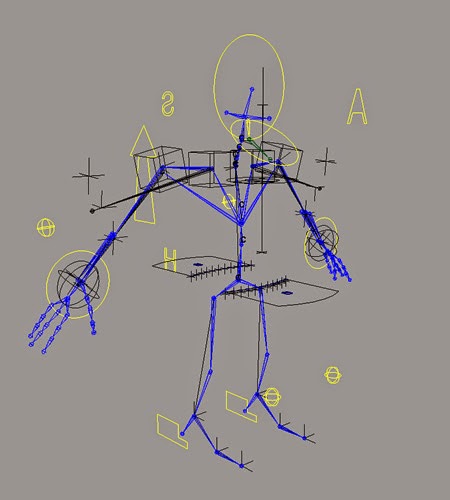
3D Rigging Pipeline in Animation

rigging

The process of Rigging is the concept and staging of creating a skeleton for a 3D model that is needed to be animated. Each skeleton could be different dependent on the model’s shape and their demands of how it needs to move and be animated. By the end, it all comes down to how the animators want the model to deform and creating an easy enough menu for them to be able to use the controls of these deformations to move this character.
“Rigging is the process of creating an organized system of deformers, expressions and controls applied to an object so it can be easily and efficiently animated. A good rig should intuitively allow an animator to concentrate on the art of animation without the technical aspects of rigging getting in the way. In addition, a good rig should be well organized so it can easily be changed, repurposed, or fixed if there is a problem.”
Usually Rigging proceeds with a pipeline of planning and finishing a rig with the steps below. We will be using a hand model as an example for these steps:

Analyse the problem:


We first design a rig for the hand model. Consider the number of joints needed to make the fingers curl, and in what directions, are required. Where would be the main base joints that controls the whole hand i.e. the wrist, and how far do you want the fingers to spread and curl in towards the palm.
Figuring out what and how to set up the controls so they are easy to understand and use for animators is also necessary in the step. So for this example, we need a control for the whole hand controlling the bend and flip of the wrist, and we need some separate controls for each finger and their own curl and spread attributes.

Test of the Solution:


We smooth bind the rig to the model and see how the joints work with the topology. Sometimes more topology or more joints on the rig are needed to make the combination work more smoothly and make the deformations easier. To make this work, unbinding the hand model from the created rig and doing the smooth bind process over and over again is necessary to see if improvements are happening or not.
Also giving this test rig to an animator to see if he/she is able to use the rig system you created and also fulfil its needs to deform to the lengths they want the character to, must be noted for future improvements in the re-making of this rig.

Solution Analysis:


Usually the first rig created would have flaws for both the modeller and the animator. For this example, the hand control is fine, but the fingers curling and spreading attributes needed more work. They weren’t following the joints as they were supposed to. I assume this was due to hierarchy issue during the parenting and constraints.
The hand itself wasn’t as fluent with movement and flexible as I wanted for expression and animated hand gestures. This rig could also help if I wanted to just pose this hand for rendering/texturing shots but I wanted to make this efficient and usable for animators too.

Recreating of the clean solution:


After much frustration, it was decided to just to rebuild the rig from scratch. Though for the second round, I made sure to delete all history on the hand model itself after I added a few more edge loops around the fingers, wrist and thumb.
And I redesigned the hand control to make it easier to understand and also more visually appealing.

Final recreating:


After much editing with the joint positioning and also the topology of the hand model, it was working smoothly with a heatmap smooth bind in Maya. Locking and hiding alot more of the unneeded attributes did help with the process as that’s what may have disrupted the first rig’s success. Fear in rigging did hinder this project but with this assignment along with my showreel, just showed that each project needs a customised rig to do what was needed to be done.
Not all of the necessary turns, bends and transformations are needed for all characters and models. But to get the action poses you desire for the renders, need to go through quite a few number of test trials of the rig and model together. This was a great test for myself on speed, priorities and memory based on repetition.
“…joints are really just another deformer. Sure they get their own set of menus and a whole bunch of cool options, but when you get right down to it, their main purpose is to deform geometry.”
Read More
// // Leave a Comment

Shotgun launches iPhone review app, Shotgun Desktop and MARI Integration at SIGGRAPH 2014

Shotgun Software, developer of cloud-based production tracking, review & approval, and asset management tools for film, TV and games, delivered three major releases recently to help creative companies streamline processes and go faster. The company launched a mobile app that brings the power of Shotgun Review to the iPhone; Shotgun Desktop, a native app shelf that gives artists fast access to productivity tools; and integration with The Foundry’s MARI 3D paint software, which helps speed up the workflow for texture artists.

Shotgun Review for iPhone


With Shotgun’s first mobile app, supervisors can take their projects anywhere they go with a full set of tools to review and give their artists clear, visual feedback on work in progress. They’re able to stay connected without slowing down while they’re on set or on the run, and unblock artists for faster iteration. With the app supervisors can: Browse media and playlists in all projects, Play back movies, Annotate on one or more frames in the movie, Give feedback with notes and attach camera images or movies and See history on related versions and their notes.


VFX Supervisor Joshua Saeta, who recently worked on films that include Sin City 2 and Earth to Echo, has been beta testing Shotgun Review for iPhone. “Having Shotgun on my iPhone is a complete life saver,” he said. “I could be in the middle of a shoot in New Mexico and have the director take a quick look at a digital matte painting and get feedback right there on set, on the fly, and get it back to my artists. Having the flexibility to get basic feedback instantly on a device that everyone carries in their back pockets is invaluable.”

Shotgun Desktop


Shotgun Desktop is a simple, visual interface that gives artists fast access to key productivity tools directly from the menu bar. Artists can quickly launch tools like Maya, Nuke or Photoshop, pre-configured with integrated apps that help automate key tasks – like loading files created by other artists or publishing their work – without having to go back to a browser or remember naming conventions and directory structures. Any app that the studio chooses to make available can be accessed, whether it’s a third-party product, an in-house pipeline tool, or something from the growing list of apps that Shotgun is building and delivering.

Shotgun Desktop also makes developers’ jobs easier and more efficient, supplying a high-quality, productised app framework with a polished, artist-friendly UI that works across Linux, Mac and Windows. They can build Python apps quickly and deploy them right out to artists’ desktops.


Scott Ballard, Pipeline Supervisor at Encore Hollywood (which works on post and VFX for TV episodics including House of Cards, Under the Dome and Extant) has been working with an early version of Shotgun Desktop. He said, “This tool is going to save me a ton of time on the development side when we roll out pipelines for new shows; a lot of the initial setup and project configuration are nearly automatic. When our artists get their hands on it they’re going to love having an easy, consistent place to launch things. With the kind of timetables we face in TV work, anything that saves steps and gets us up and running faster is a huge help.”

MARI Integration


Shotgun has integrated The Foundry’s MARI 3D paint tool, including the full suite of Pipeline Toolkit apps. Now artists using MARI can work faster with the Shotgun loader, publisher and other apps, right inside the MARI interface, saving steps related to file management and connecting to other artists on the project. The integration also includes a Maya/MARI round-trip that connects modeling, textures, and lookdev.

Jack Greasley, MARI Product Manager at The Foundry said, “The Foundry and Shotgun share a strong commitment to improving the experience of all of our clients, and it’s great to be able to make processes more efficient for them by integrating the tools they use every day. With Shotgun’s native support for MARI we’re streamlining a process that’s very common for texture artists in film and commercial work by enabling them to snapshot and publish files directly from within MARI.”


Don Parker, Shotgun Co-Founder/Autodesk Sr. Director said, “We designed and built all three of these tools specifically to help artists and supervisors go faster. If we’re able to save each person another 10 to 20 minutes a day, they’re more focused and the combined impact across the studio can be massive.”

A recent news from Animationxpress
Read More
// // Leave a Comment

Indiantelevision.com Introduces “Best Sound” Category in the Upcoming 13th Indian Telly Awards

Indian Television Dot Com Pvt. Ltd. and Dolby Laboratories, Inc. (NYSE:DLB) today announced “Best Sound” category in the upcoming 13th Indian Telly Awards. With the onset of digitization of television services, high quality sound has increasingly become an important aspect of television content. Recognising this important industry change, Indiantelevision.com’s much acclaimed Indian Telly Awards has announced the inclusion of the Show with the Best Sound category in its 13th edition. The sound category is being instituted in collaboration with Dolby Laboratories, a pioneer in audio technology.


“Indian consumers have become more discerning today,” said Anil Wanvari, Indian Telly Awards founder and creator, and International Academy of Television Arts and Sciences (International Emmy Awards) member, commenting on the announcement. “While watching a show at home, these consumers want a similar sound experience to what they get in a cinema hall. And this has become more important with over three million HD TV subscribers in India. With an aim to meet this need of discerning viewers, broadcasters have started investing to make shows sound much better. This trend is bound to increase with the spread and increase in the number of HD channels, digitization, DTH, and digital cable TV. We at the Indian Telly Awards are extremely delighted to introduce the sound category and are grateful to Dolby for collaborating with us on the initiative.”

A jury consisting of top names in the sound industry will take into consideration the entire gamut of the sound production process – location recording, sound design, mixing, rerecording, editing – to give the award to the one TV show with the best sound design and mixing. The jury will include Academy Award winning sound mixer Resul Pookutty; National Film Award winning sound designer Bishwadeep Chatterjee; Bhaskar Pal, Content Services Engineer, Dolby; and Anil Wanvari.

“It gives me immense pleasure to know that sound is being recognized as an award category in the Indian Telly Awards,” said Bishwadeep Chatterjee. “This would not only give a huge morale boost to the sound technicians but sensitize the producers, directors, actors, and the public by and large to a relatively much lesser known yet very important aspect of television. Thanks to the initiative by Dolby, we can look forward to great sound quality, which will hopefully enable the producers to keep a substantial budget and time for the sound department.”

Resul Pookutty said, “Being a sound designer, I am very glad that the Indian Telly Awards and Dolby together are giving sound the due recognition which it very well deserves. I truly believe that this initiative will help raise awareness about the importance of good sound in television, which in turn will make audiences more interested in newer TV shows. I hope to see more such initiatives and importance being given to sound in Indian television shows going forward.”

Pankaj Kedia, Country Manager, Dolby Laboratories India, said, “We are very excited about this announcement, as this award will give the due recognition to sound in the broadcast industry. Dolby has participated and contributed in the transformation of sound in the Indian cinema and television industry. It gives us great pleasure that the role sound plays in storytelling and engaging the audiences is being given the due importance and recognition.”

The Indian Telly award for the category of show with the best sound will be announced at the gala event on September 9, 2014, at Mumbai’s Film City.
Read More
// // Leave a Comment

Animation, Gaming & Special Effects to get a National Centre of Excellence

There is some great news for the animation, gaming and VFX industry. According to the announcement made by the Finance Minister Arun Jaitley, the Film & Television Institute (FTII), Pune and Satyajit Ray Film & Television Institute, Kolkata will be accorded status of Institutes of national importance and a National Centre for Excellence in Animation, Gaming and Special effects will be soon set up.


Apart from this he also stressed on rural development, and making internet available in the interiors of the country to really encourage and push the industry to tap into the talent pool in these areas as well.

A statement by PwC stated: “We have been closely involved with the Government for conceptualisation of the National Centre of Excellence on Animation, Gaming and Visual Effects and we thus welcome the nod from the new Government for its implementation.”

We at AnimationXpress.com reached out to the industry to get their reaction on the budget and surprisingly got a mixed one, with some really pleased and a few left asking for more.

Hungama Digital Media & Entertainment MD & CEO, Neeraj Roy says: “Whilst it is very encouraging to see the government giving more attention to the internet and support of animation and gaming, I view the initial allocations as a small step in the right direction. China has a near $ 1 Trillion internet economy; India will transition from 2G to 4G and add another 400 million mobile internet users over the next three years. We need an unprecedented push toward digital for a significantly higher consumer adoption as it will spark productivity across sectors. The aspect of bringing back online advertising into the service tax ambit, whilst it is still a fledgling segment, is therefore almost a conflicting action and not a welcome move.”

“I truly believe this is an encouraging step by the ministry to really drive the Animation, Gaming and VFX segments. With this step, the youth of the nation will be encouraged to seriously consider playing an important role in developing the sector further,” Maya Digital Studios, media & broadcast relationship head Aruna Kumar exults.

Technicolor India – Country Head, Biren Ghose went on to explain the benefits of the budget in a little more detail. “This is a very significant move by the finance minister – it is heartening to see that the animation, gaming and VFX industry is getting a specific mention and recognition in the union budget for the 1st time – after years of having made representations for the sector.”


“It is still up to industry to leverage this opportunity and work hand in hand with the Government to ensure that standards and best practices are implemented, based on various initiatives announced; evolve a proper game plan and ensure implementation and success. The skills development funds; the technology and rural development funds and other projects announced should also be “pitched” by the AVGC sector to develop the talent pipelines and also make optimum use of the resources contemplated. Finally, the COE’s need a very detailed prescription on syllabus, faculty recruitment, international alliances, if they are to realise their ambition.” Ghose ends.

Bioscopewala Pictures president Nishith Takia really welcomed the budget with open arms and says: “This is a very encouraging move by the ministry for the sector; the setting up of the National Centre of Excellence will help in getting in the right people into the industry, who are given proper education and guidance along with the training to excel in this blossoming field.”

“Also with the focus on rural development, it will enable us to tap into the various talents, which is available in abundance, and with the world going more and more digital, it will only benefit in getting access to the talent pool hidden away in the interiors and at the same time be accessible to them,” he ends.

One man who was really disappointed with the announcement was Toonz Animation CEO P Jayakumar as he was expecting much more from the ministry for the sector. “I am really glad that the National Centre of Excellence has got the nod and both the institutes having been given national importance, but what I was expecting from the budget was a lot more support to the content creators and promotion of more home grown animation content.”


“We have had several meetings with the ministry in the recent past, where we have seriously raised the concern of providing some kind of financial support for small studios and encourage them to create compelling original content. Also what we were also looking forward to was the announcement of the national broadcaster coming up with a kids’ channel to promote more original content. There was also the thought of allotting fixed blocks on broadcasters in the space to run only Indian originated content, but none of those have appeared in the budget announcement, which has left me a little aghast,” expounds Jayakumar.

And finally giving his views on the budget, Animation veteran Ashish Kulkarni says: “It’s a great step to recognise the sector and also the centre of excellence getting the clearance finally is truly welcomed.”


He goes onto add: “The future of Indian animation will rely on whether the players are
given a level playing field and the studios need to evolve from the outsourcing model to creating their own IPs. Also what will help bringing stability to the industry is signing of co-production treaties with animation friendly countries to create really great content for the global audience.”
We at AnimationXpress.com will keep you updated on the latest developments around the freshly announced budget and how is it further going to impact the industry at large.


A news from Animationxpress
Read More
// // 1 comment

Disney India and Toonz Animation join hands to encourage kids to tell their stories

The initiative aims to encourage the concept and art of storytelling among kids and is part of Disney Channel’s prowess to encourage kids to express themselves, Disney India along with Toonz Animation is conducting a nationwide competition for school-going children aged between 4-14 years of age.


‘Kahaani Masters 2014’, is a concept writing competition for proposed animation short videos, written in English or Hindi language only and shall run from a period of 13 July until 12 August from 12.00 am to 11:59 pm (“Contest Period”).

‘Kahani Masters’ will encourage the creative minds of the youngest generation and give them an opportunity to unleash their imagination and share their stories with the entire world through an animated movie scripted by the children themselves.

Speaking to AnimationXpress.com Toonz Animation CEO P Jayakumar says: “It’s a one of a kind initiative and I am confident that this will really encourage kids to think of taking up animation as a career option in the future. We are expecting over 1,000 entries and the top five winners will get a chance to work with our animators to create a short animation feature of nearly 3 minutes, which will air on Disney Channel India in early 2015.”

Well known Animation film designer Dhimant Vyas along with Vaibhav Kumaresh will be judging the selection of the five winners from the entries received. The selected winners will then go through a three day intensive workshop session in Toonz Animations Studio in Trivandrum in September to fine tune their flair for storytelling and detailing.

According to Bikram Duggal, executive director – marketing kids channels, consumer products, retail, publishling and franchise, Disney India, there are four key brand promises that Disney India offers – kids can express themselves, follow their dreams, believe in themselves and celebrate their families. “With our marque property ‘Jet Set Go’, we have taken care of celebrating with the family and following one’s dreams. But, we have been keen on coming up with one property on kids expressing themselves. Since, Disney’s brand promise is – telling stories, the idea of doing ‘Kahaani Masters’, was to encourage kids to express themselves,” reveals Duggal.

There is no fixed format, it could be anything ranging from a story to a cartoon strip but should not be eclipsing more than 2-3 minutes of airtime.

“Everything, right from which colour pallet to select, to visualisation will be supervised by these kids with the animators only helping them in the execution. We want them to be as independent as possible to really nurture the talent in them,” Jayakumar exults.

A news from Animationxpress
Read More
// // Leave a Comment

Arena Perspectives: An initiative to bring animation lovers closer to the industry

Arena animation, a leading animation institution in India organised Perspectives 2014 providing a great opportunity for all animation lovers to interact with big names in the animation and VFX industry. The event took place on 19 July, 2014, from 11:00 am to 2:00 pm in Hotel Rangsharda Auditorium, Bandra Reclamation West, Mumbai.

arena animation


Industry giants such as Gaurav Malhotra – Artha Animation, Ahmed Naqvi – Gozoop, Kedar Khot – Prime Focus, Suresh Konda Reddy – Prasad Group, Prashant Mukhare – Blink digital, Emraan Kureshi – Active Media Innovations interacted with over 400 animation and VFX enthusiasts that attended the event and shared their ideas and thoughts on pertinent subjects like ‘The Making of International Animated TV Commercials’ and ‘3D Projection Mapping & Augmented Reality’.

At this juncture, Easo Thampy Matthew, head of operations for Arena Animation, said that, “We at Arena are always aiming to bridge the gap between animation/VFX aspirants and the industry. Events such as Perspectives are one of the platforms where enthusiasts can meet the professionals and get access to their insights and experiences. The students met industry professionals and 97 students were shortlisted by companies for interviews at the job fair. We are also fulfilling our goal of producing world class professionals by introducing programs that have been designed to make our students experts in the latest tools used by the industry globally.”

The event was attended by 800 participants, who enthusiastically communicated with the industry professionals. 242 students attended the job fair, of which 97 were shortlisted for interviews. The industry veterans were extremely impressed by the young talent pool and informed the students of future job prospects.

A educational news from Animationxpress
Read More
// // Leave a Comment

India Gears Up For the Launch of First Ever Autodesk University

autodesk

Autodesk, Inc has announced the launch of Autodesk University (AU) in India for the first time ever. The India leg of the world’s largest learning and networking event for Autodesk technology users will be held on 11 and 12 September, 2014 at The Renaissance, Powai, Mumbai. This comes after the success of the Autodesk University Extension (AUx) event held in Mumbai last year. The theme of AU is ‘Learn. Connect. Explore’ and the one and half day-long event is expected to have more than 1,500 attendees. AU India will showcase the latest Autodesk technologies for Motion Capture, Reality Computing and 3D Smart Cities, among others.

AU India is the latest addition to the growing list of global cities that host AU annually. AU India offers an opportunity for India’s design ecosystem to learn from some of the world’s top technology experts through training and certification sessions. The event will have more than 650 classes to impart advanced training on Autodesk software features, as well as processes, workflow strategies, and career development for design and engineering professionals. Attendees will get a chance to obtain certifications free of cost for the latest versions of Autodesk software like Autodesk AutoCAD 2014, Autodesk AutoCAD Civil 3D 2014, Autodesk Revit Architecture 2014, Autodesk Inventor 2014, Autodesk 3ds Max 2014, Autodesk Maya 2014, Autodesk Infrastructure Design Suite 2014-Road and Highway Solution.

autodesk university


Other key highlights of AU India include:

# Keynotes by Autodesk Senior Vice Presidents Chris Bradshaw and Steve Blum

# AutoCAD breakout keynote by Lynn Allen, Autodesk Technical Evangelist

# Live Technology Demos of Motion Capture, Reality Computing and 3D Smart Cities

# Automotive Innovation Forum (AIF), which includes keynote presentations by industry experts, tracks on automotive design, visualization, simulation and manufacturing workflow, and a “Wicked Problem Solving” Workshop by Autodesk Fellow Tom Wujec

# Education Summit for academics and industry, deliberating on India’s technology and design education

# Industry sessions for design and engineering professionals from Architecture, Engineering, Construction, Manufacturing and Media and Entertainment that will offer networking and learning opportunities

“Bringing Autodesk University to India is a moment of pride for us and a testament to the success of last year’s AUx Mumbai. AU India will be much bigger and will be a dynamic forum for design and engineering professionals to learn from international experts, network with peers and explore the latest design technologies. The Autodesk Certification opportunity at AU also helps advance skills in design and innovation. This is really important in the current environment where skilling youth – with an emphasis on employability and entrepreneurship – is a key government priority,” said Autodesk – India and SAARC, MD, Pradeep Nair in a statement.

AU India will also have specialist-led sessions and industry keynotes by technical experts and customers. Notable speakers include: Lee Miller, Vice President & Director of building SMART Implementation, HOK; Atul Khanzode- Director, DPR Construction; Bimal Patwari, Chief Executive, Pinnacle Infotech Solutions; Jesh Krishna Murthy, Founder & CEO Anibrain, India, Ashish Desai, Director, Polysmart Technologies & Jyoti Plastics Works; Arun Muthumani, Senior Manager- Vehicle Styling, Escorts; Prof. Ramanathan – IIT Chennai; Prof. Anil Sawhney – Director – RICS School of Built Environment, Amity University; Dr. Srinivasan – Founder Chairman – GEAR School.
Read More
// // Leave a Comment

Imageloom VFX | Jobs in animation


Imageloom VFX

imageloom VFX


After working for some of the biggest names in the visual effects industry globally, Imageloom ‘s founders wanted to find their own way to shine. The company was started with a dream of letting their imaginations take center stage, and now, it is well on its way. As a team, we strive to create beautiful new media that propels the industry forward, both artistically and technically. It is our goal to make stunning animations and visual effects that stand the test of time, deriving their lasting power from unquestionable skill and inspiration.

Available Positions:-

1. Executive Producer / Head of Business Development

2. Paint Artist ( Senior and Mid Levels )

3. Roto Artists ( Junior and Mid Levels)

4. 3D Tracking / Matchmove Artist ( Mid Level )

5. FX Artist

6. CG Generalist

7. Compositor


You can find a detailed description of the available posts below:-

Executive Producer / Head of Business Development


Having delivered shots for a few Hollywood shows successfully and currently bidding actively for new shows with multiple clients, we are looking for an highly talented individual who can help expand our VFX business by acquiring new clients both in the international as well as domestic markets.

Responsibilities

Create and execute a marketing/sales plan to achieve pre-agreed target revenue numbers.
Use either existing personal industry contacts or acquire fresh ones through networking and market knowledge to develop new client relationships and business opportunities.
Exhaustively research potential partner companies to generate quality leads.
Collaborate with founders and the creative team to bid on projects and close deals.
Understand and stay current on the industry trends to identify new markets and clients.
Keep abreast of the competition to stay ahead.

Requirements:

Minimum 5 years experience in Business Development.
Demonstrated ability to close deals and generate revenue
Provable personal industry contacts.
Exposure to the Visual Effects industry is a huge plus.
Empathic communicator who is able to view things from others’ perspective as well as communicate own perspectives to others.
Compensation will not be a constraint for the right candidate.

Paint Artist ( Senior and Mid Levels )


The Paint Artist is responsible for wire/rig removal, beauty fixes, and creating clean plates for the Compositor. Along with the essential paint skills, an eye for detail is a must. We are looking for both Senior and Mid level artists to work on major Hollywood shows. Experience with Stereo Paint a huge plus.

Requirements

3+ years of experience for Mid level and 5+ years for Senior level, ideally working on feature films
Prior experience working on Hollywood shows a major plus.
Thorough knowledge of Photoshop and Nuke
Knowledge of Mocha Pro
Wire and Rig Removal experience
Clean and efficient script maintenance
Basic knowledge of 2D and 3D tracking
Excellent eye for details
Ability to work well in a team environment
Highly motivated and flexible
Linux experience will be a plus
Excellent organizational, communication and interpersonal skills.
Proven ability to work closely with other artists under tight production deadlines.
Provide secondary technical support and training as needed.
Excellent problem solving skills
Be able to take directions/critiques, interpret notes and learn/apply new skills.
Candidates must provide online reel links for consideration.
Position based in Chennai

Roto Artists ( Junior and Mid Levels)


The Roto Artist is responsible for creating mattes and roto splines for later compositing. An excellent eye for detail is a must. We are looking for both Junior and Mid level artists to work on major Hollywood shows.

Requirements

1+ years of experience for Junior level and 3+ years for Mid level, ideally working on feature films
Prior experience working on Hollywood shows a major plus.
Thorough knowledge of Nuke, Silhouette and After Effects
Clean and efficient script maintenance
Basic knowledge of 2D and 3D tracking
Excellent eye for details
Ability to work well in a team environment
Highly motivated and flexible
Linux experience will be a plus
Excellent organizational, communication and interpersonal skills.
Proven ability to work closely with other artists under tight production deadlines.
Provide secondary technical support and training as needed.
Excellent problem solving skills
Be able to take directions/critiques, interpret notes and learn/apply new skills.
Candidates must provide online reel links for consideration.
Position based in Chennai

3D Tracking / Matchmove Artist ( Mid Level )


The 3D Tracking / Matchmove artist is responsible for both camera tracking as well as object tracking for set extension, object insertion and other purposes. A good knowledge of camera techniques as well as lenses used in feature films is a must.

Requirements

3+ years of experience, ideally working on feature films
Prior experience working on Hollywood shows a major plus.
Thorough knowledge of 3DEqualizer, Boujou and Syntheyes
Good knowledge of camera models, camera techniques (zoom, pan, focus, dolly etc.) as well as about lenses used in feature film production.
Excellent eye for details
Ability to work well in a team environment
Highly motivated and flexible
Linux experience will be a plus
Excellent organizational, communication and interpersonal skills.
Proven ability to work closely with other artists under tight production deadlines.
Provide secondary technical support and training as needed.
Excellent problem solving skills
Be able to take directions/critiques, interpret notes and learn/apply new skills.
Candidates must provide online reel links for consideration.
Position based in Chennai

FX Artist


The FX Artist is responsible for creating, shading and rendering photo-realistic Rigid Body Dynamics simulations, Fluid Simulations and Particle Simulations, as part of a team or independently.

Requirements

Excellent knowledge of Houdini and/or Maya
3+ years experience, ideally working on feature films
Proven experience in producing effects such as smoke, dust fire, clouds, water, explosions etc.
Knowledge of cloth & hair/fur simulation a plus
Excellent eye for details.
Working knowledge of physics and mathematics
Ability to work well in a team environment
Highly motivated and fexible
Python, MEL, Linux experience will be a huge plus
Excellent organizational, communication and interpersonal skills.
Proven ability to work closely with other artists under tight production deadlines.
Excellent problem solving skills
Provide secondary technical support and training as needed.
Ability to work well under pressure and meet production deadlines
Candidates must provide online reel links for consideration.
Position located in Chennai

CG Generalist


The CG Generalist demonstrates a strong base knowledge across the entire visual effects pipeline. Successful candidates will have a mix of advance knowledge and varied skill levels in all areas of the pipeline viz. modeling, texturing, basic FX simulation as well as compositing. The CG generalist will work both on individual basis and within a team, with tasks ranging from completing all aspects of some shots on their own to supporting other team members on specific tasks.

Requirements

3-5 years experience, ideally working on feature films
Excellent team player
Highly motivated and flexible
Advanced working knowledge of Maya
Experience with Nuke, Photoshop, Arnold, Vray or a similar renderer
Python, MEL, Linux experience will be a huge plus
Excellent organizational, communication and interpersonal skills.
Proven ability to work closely with other artists under tight production deadlines.
Provides secondary technical support and training as needed.
Excellent problem solving skills
Candidates must provide online reel links for consideration.
Position located in Chennai

Compositor


The Compositor is responsible for taking multiple diverse elements (live footage, CG rendered elements, stock elements etc.) and combining them to create the final image. You should be able to take elements from a variety of sources and bring them into the same color space and composite them.

Requirements

3-5 years experience, ideally working on feature films.
High proficiency in Nuke a must.
An education or experience in real world lighting and photography a plus.
Excellent team player
Highly motivated and flexible
Linux experience will be a huge plus
Excellent organizational, communication and interpersonal skills.
Proven ability to work closely with other artists under tight production deadlines.
Provides secondary technical support and training as needed.
Excellent problem solving skills
Candidates must provide online reel links for consideration.
Position located in Chennai

Please send a resume to jobs@imageloomvfx.com and include the position for which you are applying in the subject line of the email.

Also Read: What is #animation | what do you mean by animation?
                 #3D modelling | what is #3D modelling and whats its uses
                 What does a Video Game Designer do? Where does a Video Game Designer work?
                The Job factors related to #animation filed and The Possibilities of Animation Students
                Animation As A Career | What you are choosing for your future as like your interest?
                Animation in todays technology era and its importance
               The job of a #Rigging Artist| what is the job of a #Rigging Artist?
               What is Rigging in MAYA and what its value in Animation field?
                #Animation in brief | #Brief description about Animation

Read More